Telenor Balance Save Code 2026 – Stop Your Credit From Disappearing Overnight
If your Telenor balance drains overnight for no reason, you’re not alone. Discover the *7799# balance save code, how it prevents silent deductions, and the exact fixes to keep your balance safe.
You Recharged Yesterday. Today, it’s Almost Gone. Here’s Why.
This is one of the most common complaints among Telenor prepaid users in Pakistan: a recharge that should last days disappears within hours, with no obvious call, text, or browsing session to explain it. The frustrating part isn’t even the lost money. It’s not knowing why it happened or how to stop it from happening again.
The short explanation: once your internet bundle runs out, but mobile data stays switched on, your phone doesn’t stop trying to use the internet, it just switches to charging you directly from your main balance, usually at a much steeper per-MB rate than any bundle offers. Background apps (WhatsApp, Instagram, system updates, cloud backups) keep quietly consuming data in the background, completely unaware that your bundle has expired.
Telenor’s answer to this is the Balance Save Code, *7799#. This guide explains exactly what it does, what it doesn’t do (the part most articles skip), how to combine it with other habits for full protection, and how it stacks up against similar features on Jazz, Zong, and Ufone.
What the Telenor Balance Save Code Actually Does
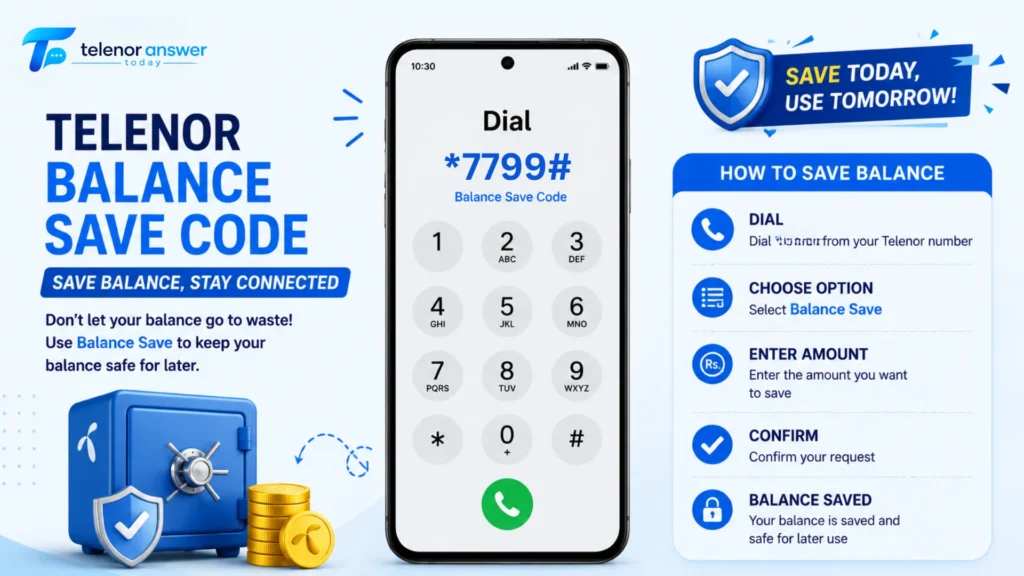
*7799# activates what’s officially a balance protection feature; it stops your data session from continuing once your active internet bundle is exhausted. Instead of switching to default per-MB billing (which can be Rs. 1 or more per MB depending on your account type), the connection simply cuts off.
Think of it as an automatic safety switch rather than a savings account. It doesn’t add money to your balance, and it doesn’t reduce the cost of anything you actively use. What it does is close the gap that lets your balance drain silently when you’re not paying attention.
The activation code:
Dial *7799# and follow the on-screen prompt.
Cost to activate:
Free in most cases, though some sources report a small nominal fee around Rs. 0.50 depending on account type and current Telenor promotions, so it’s worth checking the confirmation message you receive after dialling.
How to Activate the Balance Save Code — Step by Step
- Open your phone’s dial pad
- Type *7799# exactly, no spaces
- Press the call button A menu or confirmation prompt will appear, follow the on-screen instructions to confirm activation
- Wait for the confirmation SMS confirming the balance protection feature is now active
Once activated, the protection applies automatically going forward, you don’t need to dial anything before each browsing session. It runs quietly in the background until you choose to turn it off.
To deactivate it later: Dial the same code, *7799#, and select the deactivation option from the menu that appears.
What This Code Does NOT Protect You From — Read This Before You Assume You’re Covered
This is the gap in almost every existing guide on this topic, and it matters more than the activation steps themselves.
*7799# only stops data-related balance drain after your bundle expires. It does not protect your balance from:
| What Still Drains Your Balance | Why *7799# Doesn’t Help |
|---|---|
| Calls made after your call package expires | This is a voice charge, not a data charge — separate billing system entirely |
| SMS sent after your SMS bundle runs out | Same as above — text charges aren’t covered by the data-focused save code |
| Subscribing to a premium SMS service or content service | These are third-party billing arrangements that bypass standard data protection |
| VAS (Value Added Services) you’ve accidentally subscribed to | Things like daily horoscope SMS, ringtone services, or quiz subscriptions bill separately and continuously |
| An advance balance loan repayment being deducted | This is a scheduled deduction tied to a previous *0# advance, unrelated to data usage |
The honest takeaway: if your balance disappeared because of an expired data bundle and background apps eating into it, *7799# solves that specific problem. If your balance is vanishing for a different reason, an unwanted VAS subscription, expired call minutes, or an outstanding advance, this code won’t touch it, and you’ll need a different fix entirely.
How to Tell Which Type of Drain You’re Actually Dealing With
Before activating *7799#, expecting it to fix everything, it helps to diagnose what’s actually happening. Here’s a practical checklist:
Check 1 — Is your data bundle actually expired?
Dial *999# to check remaining MBs. If it shows 0 MB and your balance has been dropping, this is a data-overage issue, exactly what the Balance Save Code addresses.
Check 2 — Is it happening even with mobile data switched off?
If your balance still drops with data completely disabled, the cause isn’t data-related at all. This points toward a VAS subscription, an expired call package being used for calls, or an SMS-based service.
Check 3 — Did you take an advance balance recently?
If you used the *0# advance loan code within the last 30 days, a chunk of any recharge will automatically go toward repaying that. This isn’t a “drain,” it’s a scheduled repayment. Check the Telenor Advance Balance Loan Code guide if you’re unsure whether this applies to you.
Check 4 — Are you receiving any unusual SMS notifications about a subscription?
AS subscriptions almost always send periodic confirmation texts. If you’ve been ignoring messages about a “daily service” or “weekly content pack,” that’s likely your culprit, and the fix is to unsubscribe from that specific service, not activate balance save.
How Telenor’s Default Data Rate Actually Works (The Part Nobody Explains Clearly)
Most articles say “Telenor charges high rates after your bundle ends” without explaining what that actually means in rupees. Here’s the practical version.
When your data bundle is fully used, and mobile data remains switched on, Telenor’s network doesn’t block your connection automatically; by default, it lets you continue browsing and charges you at a default per-MB rate, sometimes referred to as a “pay as you go” rate. This rate is significantly higher than what you’d pay within any bundle, often by a factor of 10x or more per MB.
A real-world example of how this adds up:
A typical 1 GB weekly data bundle might cost around Rs. 80–120, working out to a fraction of a rupee per MB. Without an active bundle, that same 1 GB of usage at default rates could cost several hundred rupees, sometimes exceeding the price of the original bundle several times over, all without you making a single deliberate decision to spend that much.
This is precisely the scenario *7799# is designed to prevent. Once activated, instead of silently switching to this expensive default rate, your data connection simply stops working until you either activate a new bundle or manually disable the protection.
The Bill Shock Offer — Telenor’s Alternative Protection Layer
Separate from *7799#, Telenor has occasionally run something called the Bill Shock Offer, a low-cost add-on bundle specifically designed to prevent the scenario above by giving you a small buffer of data at a fixed, predictable cost rather than exposing you to default per-MB rates.
This isn’t a permanent feature in the way *7799# is; its availability and exact terms (price, MB allowance) can shift based on current Telenor promotions. If you dial *7799# and are offered something resembling a “Bill Shock” bundle as part of the activation flow, it’s worth reading the terms shown on-screen before confirming, since it may come with a small recurring charge rather than being entirely free.
The practical difference: *7799# is a blocking mechanism (stops usage entirely once the bundle ends). A Bill Shock-style offer is a buffer mechanism (gives you extra usage at a known, fixed cost instead of the unpredictable default rate). Depending on what you need, hard protection versus a small safety cushion, one may suit you better than the other.
A Layered Approach — Combining the Code With Habits That Actually Work
*7799# is one tool, not a complete solution. For genuinely reliable balance protection, pairing it with a few habits closes most of the remaining gaps:
1. Turn off mobile data manually when you know your bundle is close to running out. Checking your remaining MBs via *999# takes a few seconds and removes any ambiguity.
2. Disable automatic app updates over mobile data. Both the Google Play Store and Apple’s App Store let you restrict updates to WiFi only; this single setting prevents one of the most common sources of unexpected background data use.
3. Review your active subscriptions periodically. Dial *345# or check the My Telenor App’s subscriptions section to see if any VAS services are quietly running that you don’t remember signing up for.
4. Subscribe to a data bundle before you start browsing, not after you notice the problem. This sounds obvious, but the habit of “I’ll just browse and recharge a package later” is exactly how default-rate charges sneak up on people.
5. Set a calendar reminder a day before your weekly or monthly bundle expires. A 10-second reminder is cheaper than even one accidental default-rate session.
Telenor Balance Save vs. Jazz, Zong, and Ufone — How Does It Compare?
Every major Pakistani network offers some version of balance protection, though the mechanics and naming differ slightly.
| Network | Feature Name | Activation | What It Covers |
|---|---|---|---|
| Telenor | Balance Save Code | *7799# | Stops data charges after bundle expiry |
| Jazz | Balance Save / Data Lock | *117*5# (varies) | Similar data-expiry protection |
| Zong | Bill Shock Protection | *629# (varies) | Data overage protection, similar mechanism |
| Ufone | Internet Saver | App-based primarily | Data usage alerts and limits |
What stands out:
All four networks address the same core problem, uncontrolled data charges after a bundle ends, but Telenor and Jazz lean more on direct USSD activation, while Ufone has moved more of this functionality into its app interface. None of the major networks offers a single code that protects against every type of balance drain (calls, SMS, VAS) simultaneously. This is an industry-wide gap, not a Telenor-specific limitation.
Troubleshooting — When *7799# Doesn’t Behave as Expected
| Problem | Likely Cause | Fix |
|---|---|---|
| Code doesn’t respond / no menu appears | Weak signal or temporary network issue | Wait a few minutes and retry, or check signal strength first |
| No confirmation SMS received | SMS delivery delay, common on busy networks | Check your subscription status via *345# or the My Telenor App instead of waiting on SMS |
| Balance still dropped after activating | The drain wasn’t data-related (see diagnostic checklist above) | Confirm via *999# whether your data bundle was actually the source |
| Code works on one SIM but not another | Account-type variation (postpaid numbers may not support this code) | *7799# is built for prepaid accounts; postpaid users should check billing settings via the My Telenor App instead |
| Activated successfully but data still works after bundle ends | A new bundle may have auto-renewed, masking the expiry | Check *999# to confirm whether a new bundle activated automatically before assuming the save code failed |
| Want to undo the protection temporarily | Forgot deactivation steps | Dial *7799# again and select the deactivation/turn off option from the menu |
Frequently Asked Questions
Final Thoughts
The Balance Save Code solves a real and common problem, but it solves exactly one slice of it, the silent data drain that happens when a bundle expires and your phone keeps trying to connect anyway. That’s worth activating, and it’s free in most cases, so there’s little reason not to turn it on.
The mistake worth avoiding is treating *7799# as a universal shield. If your balance disappears for reasons unrelated to data, an old VAS subscription, an outstanding advance, or calls made past your package limit, this code won’t catch any of it. Running through the diagnostic checks above before assuming the save code has failed will save a lot of confused troubleshooting.
For checking exactly how much balance and data you currently have, see the Telenor Balance Check Code guide. If you’ve recently taken an emergency advance and are wondering why your recharge didn’t go as far as expected, the Telenor Advance Balance Loan Code guide explains exactly how that repayment works.
Muhammad Ali is the writer behind Today Telenor Answer, where he shares daily Telenor quiz answers, balance codes, and helpful telecom tips for users in Pakistan. With years of experience, he focuses on providing clear and easy-to-understand information. He keeps content updated and ensures users get accurate and useful guides for their everyday mobile needs.